Matific's Weekly Quest is a time-based learning goal set for your students each week. Students will receive a special reward when they meet this goal. Only time spent in activities is counted towards the goal.
ℹ️By default, all the students in a class have the same Weekly Quest duration (30 minutes).
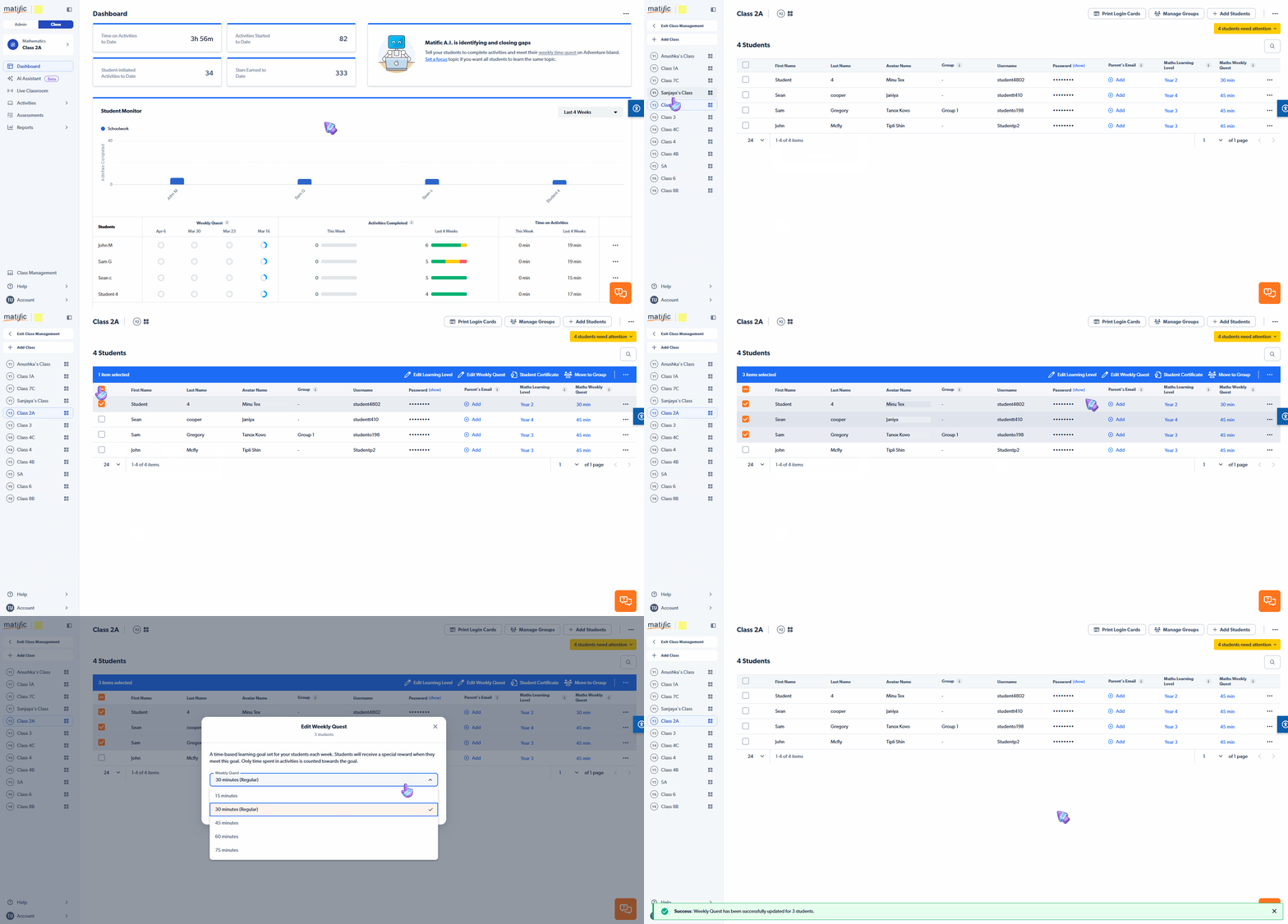
How to change a student’s Weekly Quest
- Go to Class Management
- Select your class
- Select the student(s) you want to update
- Click Edit Weekly Quest
- Choose the new Weekly Quest duration from the menu
- Click Save
When should I change a Weekly Quest?
You may want to adjust a student’s Weekly Quest if:
- You want your class to spend more time playing activities
- They are struggling to complete their weekly tasks
- You want to increase or reduce their learning pace
💡 Weekly Quests should feel achievable while still providing a meaningful challenge.
Need more help?
If you’re unsure on how to setup Weekly Quests or want to learn more, feel free to reach out to our Support Team by clicking the link below. We're happy to help.